Every minute you spend retyping past orders is a minute not spent helping customers. That's why we've supercharged EZ Entry with a "Load in EZ Entry" button at the bottom of each past order in Order History Page. Now, in two clicks and under
30 seconds, you can repopulate your cart with exactly the items you need - no manual entry required.
The Pain Point: Manual Re-Entry Slows You Down
Imagine it's Monday morning. You've got ten prescriptions to refill, a phone ringing off the hook, and your next delivery is inbound in under an hour. Manually searching for each SKU from last week's order is tedious, error-prone, and frankly, a time sink you can't afford.
Why Speed Matters
Fast reordering isn't just a convenience - it's a competitive edge. With EZ Entry's new button you will:
-
Reduce errors: By loading exact past quantities and SKUs.
-
Save hours weekly: Free up time for patient counseling, inventory checks, and more.
-
Maintain margins: Let EZ Entry pull today's lowest available prices across your wholesalers.
How It Works in Two Simple Clicks
-
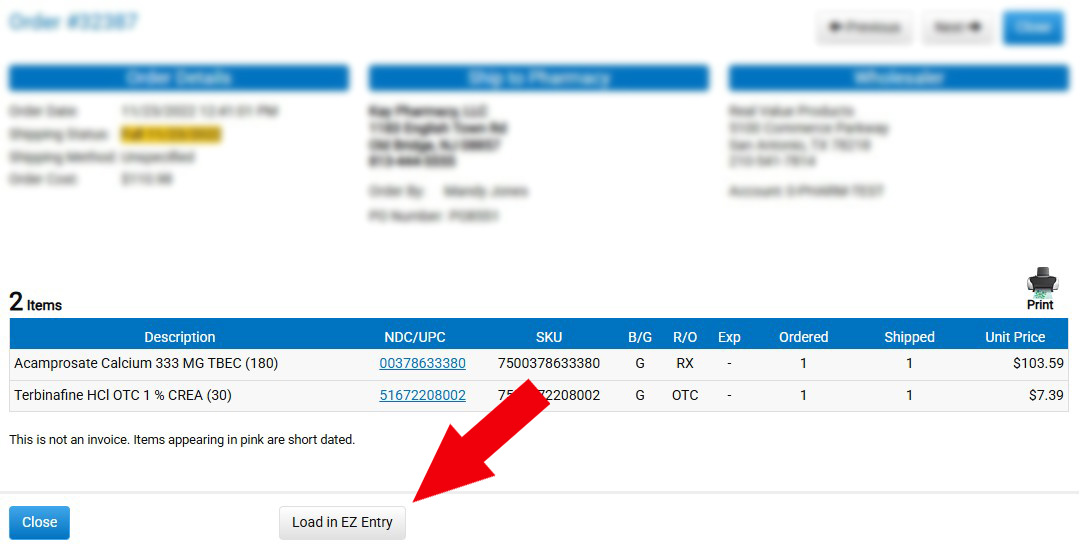
Click "Load in EZ Entry"
At the bottom of that order's history, hit the new button. Watch as EZ Entry instantly populates its entry fields with your prior items.
-
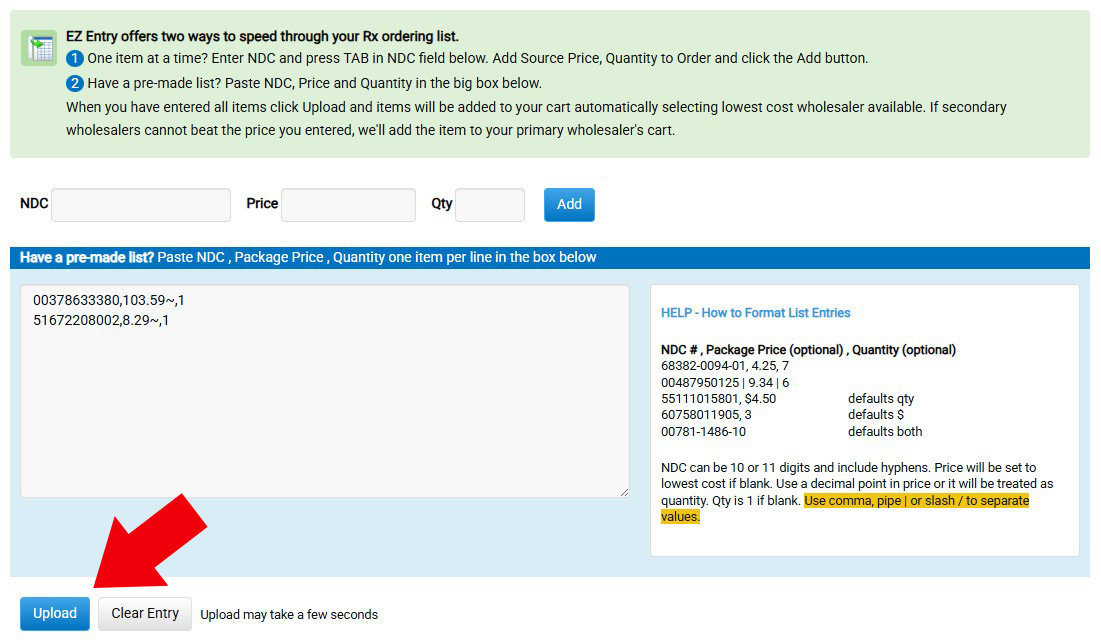
Upload to Cart
Switch to the EZ Entry screen, give it a quick review, then click "Upload" to push everything straight into your cart. Remove any extras and check out!
How EZ Entry Makes It Easy—A Quick Look
Step 1. Order History View
The new "Load in EZ Entry" button sits prominently under each order, within the Order History Page.
Step 2. EZ Entry Screen Auto-Filled
Within a second, all your SKUs, quantities, and best-price data appear in the EZ Entry - ready for your final approval.
Last Step, Review Your Cart
In just seconds, your past order is back in your cart—no typing, no searching. Now, simply review your items, remove anything you don’t need, and you’re ready to check out. With EZ Entry doing the heavy lifting, your workflow becomes faster, smoother, and far less stressful. It's not just a shortcut—it’s your new productivity hack.